A Project Handoff Without the Folder Archaeology
A project handoff works better when files, current status and the next open question are clear, so a colleague can resume work without digging.
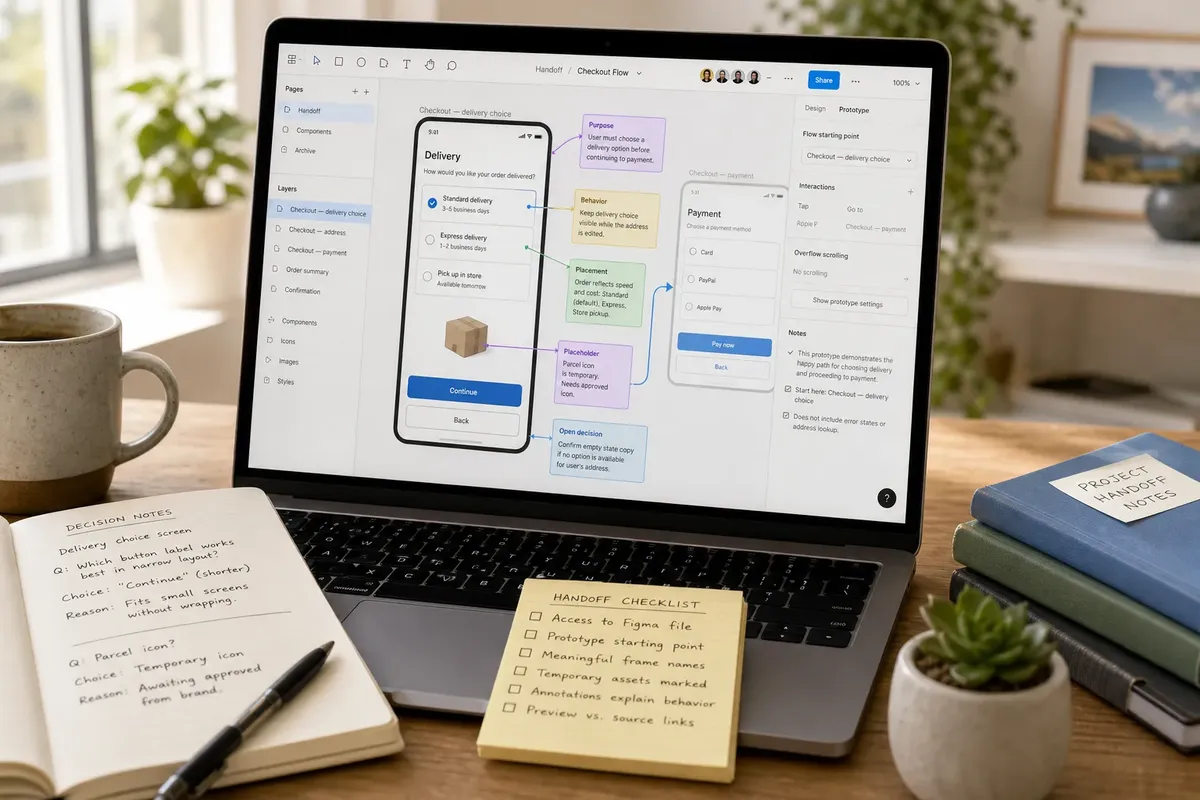
A good project handoff makes the work itself legible: the recipient can open the design, see what is unfinished and act on the next decision. For a project handoff involving a Figma prototype or a website build, that means more than tidying file names; it means preserving the logic behind the work.
Design work carries decisions that may not be obvious in a screenshot: which component is reusable, what a prototype is meant to demonstrate, and which placeholder still needs replacing. A handoff should carry those clues without turning into a long account of every edit.
Preserve design intent
Start by identifying the work’s purpose, not by reorganising every file. For an interface, tell the next person which screen or flow is in scope, what the design is meant to help a user do and which behaviour still needs a decision.
In Figma, a frame name such as Checkout — delivery choice says more than Frame 24. A short annotation can explain why the delivery options appear in that order or what should happen when a choice is unavailable. Keep these notes beside the relevant frame or component, where the design question arises.
Distinguish between a design decision and an implementation detail. A note that says “Keep the delivery choice visible while the address is edited” describes intended behaviour. The developer can then decide how to implement it within the project’s technical constraints.
Make prototypes explain themselves
A prototype is a demonstration, not necessarily a complete product. State which path it covers, what interaction to try and where the simulation stops. This prevents a recipient from mistaking a clickable mock-up for a working service.
Use Figma’s prototype starting point and connection lines to show the intended route. If the flow relies on an interaction that is easy to miss, add a brief note beside the relevant screen. Keep alternative paths visible when they affect the decision under review; hide unrelated explorations from the main route rather than asking someone to guess which one matters.
For a website handoff, a browser preview can show the intended appearance, while the repository holds the implementation. Name both roles in the handoff note. A preview link is useful for visual review, but it does not tell a developer which branch, template or content entry to change.
Separate design from assets
Linked fonts, icons and images can change how a file appears or behaves. List the assets that affect the next task and identify their location in the shared workspace. If a font is unavailable to the recipient, say whether they should use an approved substitute or leave the text styling untouched until access is sorted.
For imagery, clarify whether an asset is approved, temporary or simply a reference. A photograph placed to test a crop should not look like an endorsed campaign image. In Figma, a nearby note or a clear layer name can preserve that distinction.
Check access with the recipient’s account rather than assuming a personal library or private drive is shared. If permission is missing, point to the approved shared location or ask the relevant workspace owner to grant access.
Record design decisions
Keep a compact decision note for choices that would otherwise be easy to reopen. Record the question, the selected direction and the reason that matters to the next person. Skip a full meeting transcript; the aim is to preserve the rationale that shapes the design.
Say you are handing off an invented checkout prototype with a delivery-choice screen, a temporary parcel icon and two possible button labels. You name the screen Checkout — delivery choice, add a Figma annotation that the user must choose a delivery option before continuing, and mark the parcel icon as a placeholder. In a short note, you record that the shorter button label was selected because it fits the narrow layout, while the icon still needs approval. The recipient can continue the interaction work without treating the placeholder as final or reopening the settled label decision.
Check the handoff details
Use this pass to catch design-specific gaps before sharing. Each check should lead to a clear decision, not another round of cosmetic tidying.
- Check whether the recipient can open the editable Figma file; if access works, share the relevant page, but if it fails, request access through the project workspace.
- Check whether the prototype has a named starting point; if it does, identify that route in the handoff note, but if it does not, set the intended start or describe the path to open.
- Check whether the screens in scope have meaningful names; if they do, leave them alone, but if names are ambiguous, rename only the frames the recipient must use.
- Check whether a visible image, icon or font is temporary; if it is approved, mark it as approved, but if its status is unknown, label it as unresolved rather than implying approval.
- Check whether annotations explain the behaviour under review; if they do, point the recipient to the relevant frame, but if they do not, add a short note beside the interaction.
- Check whether the browser preview and editable source serve different purposes; if both are needed, share both with their roles, but if only implementation work is needed, direct the recipient to the repository or content system.
What should a design handoff explain?
Should every screen have a note?
No. Annotate screens where behaviour, content or a design decision would be unclear from the visual alone. A note on a straightforward, repeated component can add clutter rather than useful context.
Can a prototype replace the source file?
Only if the recipient needs to review the interaction and does not need to edit the design. For design changes, share the editable source as well as the prototype route.
How should unfinished assets be marked?
State plainly that an asset is temporary, missing or awaiting approval, and say what should happen next. Do not let a polished placeholder imply that the choice is settled.
What belongs in a decision note?
Record the question, the current choice and the reason that affects the work. If the choice remains open, name the person or role who can resolve it and the information they need.
Keep context close
Put explanations beside the design they describe: annotations in Figma, a README near a code project, or a comment in the relevant content system. Then link to that location in the handoff message. A separate note is easy to miss if the recipient has no clue where it belongs.
For a project handoff, the most useful detail is often the small bit of design intent that a file cannot show by itself: why an interaction behaves a certain way, what remains provisional, or which route is under review. Preserve that context where the next person will encounter the decision, and the work can move forward without turning its history into a puzzle.