A Website Menu Is a Map of What Matters
A website menu built around visitor questions helps people find services, prices and contact details without learning how the maker works.
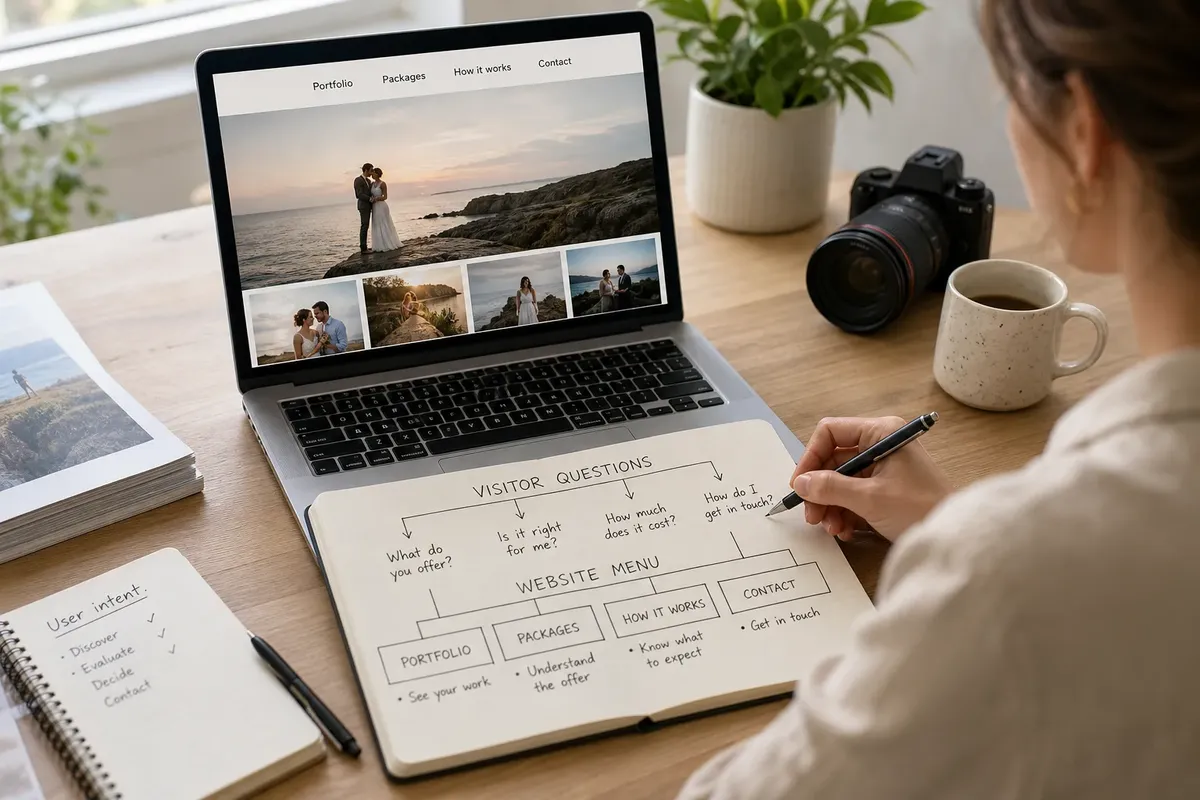
A website menu should answer a visitor’s questions, not chart the order in which you made the site. A useful website menu groups pages around what someone needs to know: what you offer, who it is for, what it costs and how to get in touch. That shift can turn a tidy list of internal departments into a map a stranger can read at a glance.
For a small site, the choice is usually between organising pages around the maker’s workflow, grouping them by visitor questions, or using a restrained hybrid. Each can work in the right circumstances. The best option depends on how people arrive, what they are trying to decide and how many genuinely distinct destinations the site contains.
Workflow-led menus
A workflow-led menu follows the way the owner thinks about the work. A photographer might label sections “Planning”, “Shooting”, “Editing” and “Delivery”. A small software studio could use “Discovery”, “Build”, “Launch” and “Support”. These labels are familiar to the maker because they describe the work from the inside.
This approach suits a site whose visitors already understand that process, or need to follow it in sequence. A client portal, training resource or project handbook may benefit from stages that match the actual journey. If someone arrives knowing they are at the editing stage, “Editing” could be exactly the signpost they need.
For a public-facing business, though, workflow labels can make visitors do extra translation. Someone looking for a wedding photographer may not know whether to open “Planning” or “Shooting” to find package details. A prospective client may not realise “Discovery” is where the studio explains its services. The navigation is orderly, but it asks a newcomer to learn the owner’s vocabulary before finding the answer.
Workflow-led menus also tend to multiply as the work grows. A new internal process becomes a new top-level item, even if visitors do not recognise it as a separate need. Choose this approach when the process itself is the subject, not merely the method behind the service.
Question-led menus
A question-led menu groups information according to the decisions visitors are likely to make. Instead of listing “Planning” and “Delivery”, a photographer might use “Portfolio”, “Packages”, “How it works” and “Contact”. The menu offers recognisable destinations without asking people to infer what lies behind an internal term.
This approach suits small service sites, portfolios and independent shops where visitors arrive with a handful of practical questions. They may want to see examples, understand the offer, check whether it fits their needs or make contact. Labels such as “Services”, “About”, “Work” and “Contact” are not exciting, but familiar wording can be useful when it points to a clear page.
Question-led navigation is not a licence to turn every possible query into a menu item. “What happens after I enquire?”, “Can you work with my team?” and “Where are you based?” might all matter, yet each does not necessarily need its own top-level link. The menu should expose the main destinations; a well-organised page can answer related questions together.
Say you run a neighbourhood ceramics studio. Visitors may want to see classes, check the kinds of sessions available and ask about booking. A menu labelled “Classes”, “About the studio” and “Contact” gives them obvious routes; your internal sequence of firing, glazing and packing need not become the site’s navigation unless visitors are there to learn those processes.
Hybrid menus
A hybrid menu keeps a visitor-facing structure while preserving a workflow term where it genuinely helps. A design studio might use “Work”, “Services”, “Process” and “Contact”. “Process” describes a visitor concern—what collaboration will involve—while the rest of the menu remains organised around broader needs.
This option suits sites with more than one audience or a service that needs explanation before someone can choose it. A consultant may serve both organisations and individuals, for example. The menu could offer “For teams” and “For individuals” if those paths lead to meaningfully different information, while shared pages such as “About” and “Contact” remain easy to find.
The risk is compromise by accumulation. Adding one workflow label, then another, can leave the menu with two competing ways of sorting the same pages. Before adding a link, ask whether it names a destination visitors recognise or simply a stage the owner finds useful. If both are true, the label may earn its place; if only the latter is true, keep it within the page or a private working document.
Choose by visitor intent
Start with the moments that bring someone to the site. A person arriving from a search for “brand identity designer” is likely to want relevant work, a clear description of the service and a way to enquire. Someone sent a direct link to a client resource may instead need a sequence of tasks. Those visitors have different jobs, so their menus need not share the same logic.
Write down the questions you expect visitors to ask, then match each question to a page that can answer it. Combine questions when the same page can serve them clearly. Separate them when the audience, decision or information is genuinely different. That exercise reveals whether a visitor-led menu is enough or whether one process route deserves a place.
Then check the labels against the actual pages. A link called “Pricing” should lead somewhere that explains the cost or the factors that shape it, not to a vague sales page. “Work” should make it easy to see relevant examples. If a page cannot fulfil the promise of its label, improve the page or choose a more accurate label.
Consider these three options:
- Workflow-led: choose it for a resource people use in a known sequence, such as a course area or project guide.
- Question-led: choose it for a small public site where visitors need to assess an offer and decide what to do next.
- Hybrid: choose it when a distinct audience or service process needs its own route, but keep the rest of the menu visitor-centred.
Which menu structure fits?
How many menu items should a small site have?
Use only the destinations that help visitors make a decision or complete a task. If two labels lead to closely related information, consider combining them into one clear page rather than making the menu longer.
Should “About” be in the main menu?
Include it when visitors need to understand who is behind the work before they enquire, buy or book. If the story is brief and secondary, a link in the footer may be enough, provided the main menu still answers the questions that bring people to the site.
Is a dropdown menu a good place for extra pages?
A dropdown can group several related destinations, but it should not conceal pages that visitors need to find quickly. Use a specific parent label and make sure the menu remains usable with a keyboard as well as a pointer.
What should I do with pages for internal processes?
Keep them out of the public menu unless visitors need those details to choose or use your service. If they do, give the page a plain label such as “How it works” and explain the process in terms of what the visitor can expect.
Check the route
A menu can sound sensible in a planning document and still feel confusing on screen. Read each label as if you have never met the owner. Ask what you expect to find after selecting it, then open the destination and see whether it delivers that answer. This simple label-to-page check catches vague links before they become part of the site’s furniture.
Look at the menu on a phone as well as a computer. A long string of labels may be easy to scan on a wide screen but cumbersome in a compact menu. Keep wording concise, avoid several links that mean nearly the same thing, and make the contact route easy to recognise if enquiry is the main next action.
It can also help to ask a person unfamiliar with the site to find a specific item, such as the services page or booking details. Watch where they look before offering hints. Their hesitation is useful information: perhaps the label is too internal, the page sits under an unexpected heading, or the menu contains competing routes.
Let pages follow questions
For most small public websites, a question-led menu is the clearest starting point. It gives visitors a familiar way to reach work, services, background information and contact details, while leaving the maker free to organise the work itself however it suits. A hybrid makes sense when a process or audience distinction is genuinely important; a workflow-led menu belongs where users come to follow that process.
Revisit the website menu when the offer or audience changes, not every time a new internal task appears. If a new page answers a question visitors already have, place it where they would look for that answer. If it serves only the maker’s workflow, keep it out of the public map. That small distinction keeps the menu useful without making it a record of everything the business does behind the scenes.